You open the flowchart tool and face a blank canvas. You know the logic you want to convey, but you don't know which shape to start with, how many layers to use, or which direction to extend in—this is the first hurdle most people encounter when drawing a flowchart.
The essence of a flowchart is to translate a "process" into a standardized graphical language. In this translation process, the hardest part is not operating the software, butMatch the correct basic structure to the scenario you want to express.A good template means the framework is already in place—you just need to fill in the specific nodes and decision conditions.
This article breaks down theFlowchart templates for 8 high-frequency scenarios, each with its core structure, usage instructions, and key design points, ready to reference and use directly.
I. Business Approval Templates
Approval workflows are one of the most common use cases for flowcharts, and the core is to clearly show "who makes what decision under what conditions."
Template 1: General Multi-Level Approval Process
Applicable Scenarios:Items requiring level-by-level review, such as leave approval, expense reimbursement approval, contract approval, and seal use applications.
Core Structure:
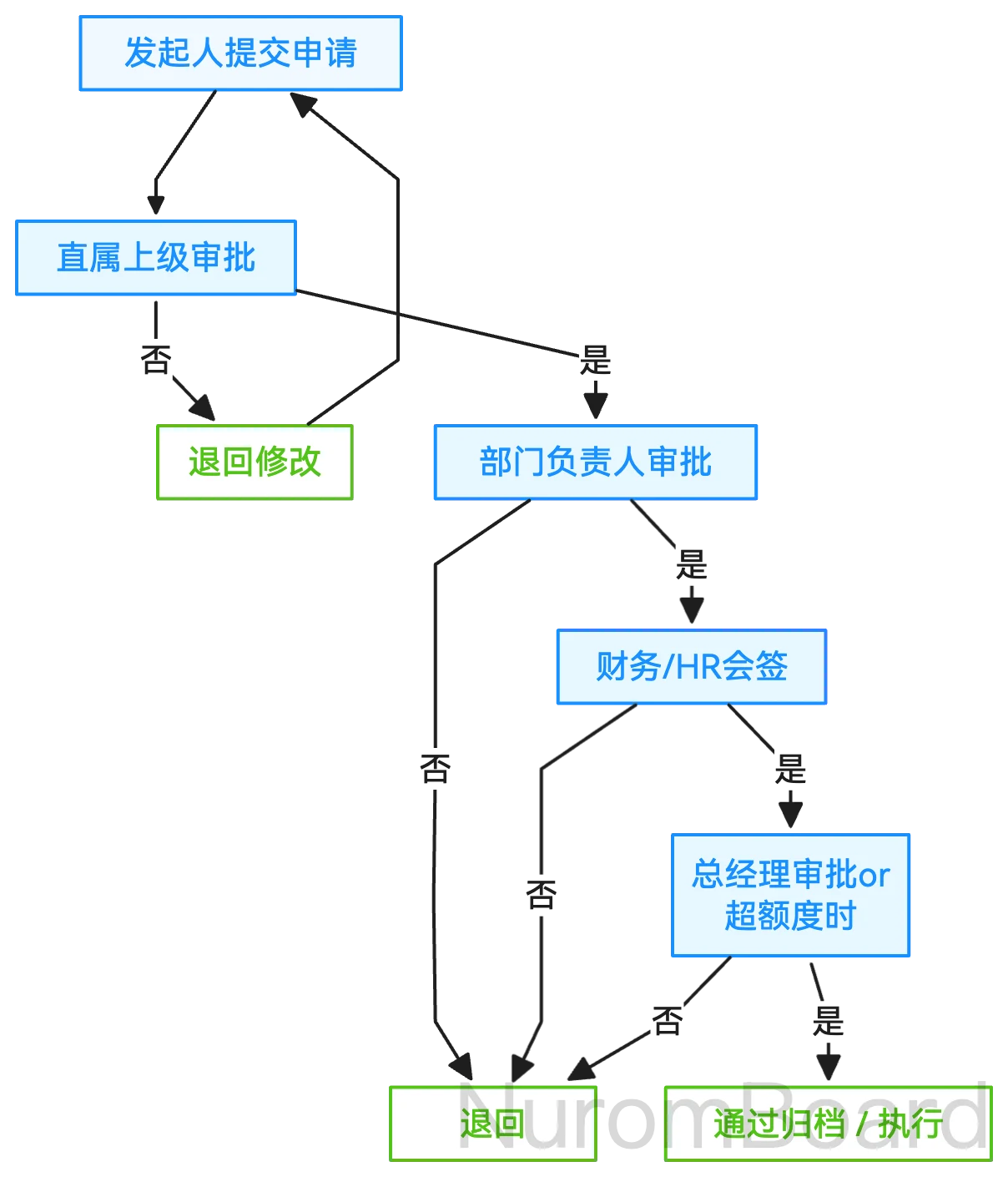
Key Design Points:
- Annotate next to each approval levelApproval conditions and time limits(e.g., "Amounts ≤ 5,000 yuan do not require general manager approval")
- The "return" path must flow back to the initiator, forming a clear closed loop.
- "Joint approval" (multiple people approve simultaneously) and "any-one approval" (approval by any one person is sufficient) are distinguished by different markers.
Template 2: Exception Handling Approval Process
Applicable Scenarios: Refund approvals, risk-control interception handling, customer complaint escalation handling, and other scenarios that require multi-branch decision-making.
Core Structure:
[Abnormal event triggered]
        ↓
[Determine: Does it meet the criteria for automated handling?]
   ↓Yes              ↓No
[System handles automatically]   [Manual review intervention]
   ↓                ↓
[Handling completed]    [Determine: Risk level?]
              ↙Low    ↘High
        [Frontline handling]  [Escalate to supervisor]
              ↓          ↓
        [Handling completed]  [Determine: Cross-departmental involvement needed?]
                        ↙Yes    ↘No
                  [Coordinated handling]  [Supervisor decision]
                        ↓
                   [Handling completed]
Key design points:
- Starting from the starting point, each diamond-shaped decision box must have two clear exits.
- Different processing paths are marked with different colors (e.g., green = safe path, red = high-risk path).
- Add comments at complex judgment points to explain the basis for the judgment.
II. Project Management Templates
The project flowchart focuses on showing the "phase-task-owner" correspondence, and the swimlane diagram is the best format for this.
Template 3: Project Phase Advancement Process
Applicable Scenarios: Projects with clear phase divisions, such as software version iterations, event preparation, and product launches.
Core structure (using small-scale event preparation as an example):
Planning Phase        Design Phase        Execution Phase        Closing Phase
        (First 3 weeks)     (First 2 weeks)     (Event week)           (1 week after)

Planning  [Concept Development]→[Review Approval]→           [On-site Coordination]
        ↓
Design            [Key Visual Design]→[Material Adaptation]
                                  ↓
Operations            [Teaser Copy]  →  [Channel Distribution]→[Data Monitoring]
                                            ↓
Full Team                                    [Retrospective Summary]
Key Design Points:
- Partition horizontally by time phase, and layer vertically by role (swimlane diagram structure).
- Stage-to-stage labelingDeliverables(e.g., "Deliverable: final key visual")
- Critical dependencies are marked with dashed arrows (e.g., design assets completed → operations can begin pre-launch promotion).
Template 4: Project Initiation Decision Process
Applicable Scenarios: Scenarios requiring multi-node decision-making, such as new project initiation, product feature reviews, and budget requests.
Core Structure:
[Submit project initiation request]
      ↓
[Requirements/value analysis]
      ↓
[Feasibility assessment] —No→ [Reject/Defer]
      ↓Yes
[Resource assessment (staffing/budget/time)]
      ↓
[Review committee decision] —Reject→ [Revise and resubmit]
      ↓Approve
[Add to plan/Initiate execution]
Key Design Points:
- Every node must have a clear input and output.
- Review decision node annotationParticipating roles and passing criteria
- The "Reject" path distinguishes between "Permanent Rejection" and "Can Be Resubmitted After Modification"
III. E-commerce/Business System Templates
This type of template describes business systems or user operation flows and is a commonly used tool for product managers and developers to align on requirements.
Template 5: E-commerce Core Order Placement Process
Applicable Scenarios:Business process mapping for e-commerce, O2O, SaaS, and other areas involving user operations.
Core Structure:
[User browses products]
      ↓
[Add to cart]
      ↓
[Proceed to checkout page]
      ↓
[Check: Is the user logged in?]
   ↓No           ↓Yes
[Redirect to login]     ↓
   ↓           ↓
[Login successful] → [Select/Confirm address]
                  ↓
            [Select payment method]
                  ↓
            [Check: Is there a coupon?]
               ↙Yes          ↘No
        [Select coupon]        ↓
               ↓            ↓
            [Confirm order amount]
                  ↓
            [Submit order/Pay]
                  ↓
          [Check: Was payment successful?]
             ↙Yes        ↘No
      [Generate order]    [Prompt to retry payment/change card]
Key design points:
- User action nodes use rounded rectangles, system decision nodes use diamonds, and system processing nodes use rectangles.
- Payment step annotation exception handling: timeout, insufficient balance, etc.
- Dashed lines mark the nodes where users may drop off (e.g., "Leave page"; dropout rate data can be labeled next to the nodes).
Template 6: After-Sales Refund Handling Process
Applicable Scenarios: E-commerce after-sales, service refunds, corporate settlement, and other fund-return businesses.
Core Structure:
[User initiates refund request]
      ↓
[Check: Is the order eligible for refund?]
   ↓No               ↓Yes
[Reject + explain reason]   [Check: Has the order been shipped?]
                      ↙No       ↘Yes
                [Direct refund]   [Check: Return required?]
                   ↓            ↙Yes    ↘No
              [Refund via original payment method]  [Await delivery confirmation]  [Partial refund]
                                ↓
                          [Warehouse inspection passed]
                                ↓
                           [Initiate refund]
Key design points:
- Time node annotations (such as the decision branch for "returns without reason are not supported after 7 days")
- Different refund types (refund only / return and refund) are clearly distinguished by branch.
- Label interactions with external systems (e.g., "Call the payment interface to refund via the original route")
IV. System/Technical Templates
Technical flowcharts focus on displaying system logic, data flow, and state changes, and are typically used with standard notations such as UML.
Template 7: User Registration and Login Flow
Applicable Scenarios:Registration and login logic review and account system design for the App/website.
Core Structure:
[User enters the registration page]
      ↓
[Enter phone number]
      ↓
[Check: Is the phone number already registered?]
   ↓Yes              ↓No
[Prompt to log in]   [Send verification code]
   ↓                ↓
[Redirect to login page]   [Check: Is the verification code correct?]
                    ↙No         ↘Yes
              [Prompt to re-enter]   [Set password/nickname]
                                  ↓
                            [Registration successful → Automatic login]
                                  ↓
                            [Redirect to homepage/onboarding page]
Key Design Points:
- All decision nodes have two exits, each labeled "Yes/No" or "Success/Failure"
- Exception branches (such as expired verification codes or network timeouts) should be drawn separately.
- Third-party login (messaging platforms/Apple ID) and other secondary branches are distinguished by different colors.
Template 8: Message Push Logic Flow
Applicable Scenarios: Design of message reach strategies such as app push notifications, email marketing, and in-site messages.
Core Structure:
[Push trigger conditions]
      ↓
[Determine: Has the user enabled notification permissions?]
   ↓No              ↓Yes
[Do not push + log]  [Determine: Is it within the do-not-disturb period?]
                    ↙Yes          ↘No
              [Delay until the next day]  [Determine: User activity level?]
                                  ↙High      ↘Low
                            [Real-time push]  [Push at an opportune time (e.g., lunch break/evening)]
                                ↓
                        [Determine: Was the push successfully delivered?]
                           ↙Yes        ↘No
                    [Log open rate]  [Attempt resend/SMS channel]
Key design points:
- Frequency control logic is clearly annotated (e.g., "the same user will not receive repeated push notifications of the same message type within 24 hours").
- Multi-channel fallback strategy is clearly presented (push → SMS → email degradation path)
- A/B test branches can be labeled individually
8 Templates at a Glance and Tool Recommendations
| Template name | Applicable Scenarios | Recommended drawing tools |
|---|---|---|
| Multi-level approval process | Leave/Reimbursement/Contract Approval | Draw.io / online diagramming tools / NuromBoard |
| Exception Handling Process | Refunds/Complaints/Risk Control | boardmix / NuromBoard |
| Project Phase Advancement | Event Preparation / Version Iteration | boardmix / Miro / NuromBoard |
| Project Initiation Decision Process | Project Initiation/Feature Review | Draw.io / online diagramming tools / NuromBoard |
| E-commerce Order Placement Process | E-commerce/SaaS business systems | Draw.io / boardmix / NuromBoard |
| After-Sales Refund Process | After-sales/Refund Settlement | Draw.io / online diagramming tools / NuromBoard |
| User Registration and Login | App/Website Account System | PlantUML / Draw.io / NuromBoard |
| Message push logic | Push/Email Strategy | boardmix / Miro / NuromBoard |
NuromBoard's flowchart capabilities: NuromBoard is more than just a whiteboard and mind mapping tool; it also has built-inComplete flowchart drawing functionality—Supports core capabilities such as drag-and-drop building, a shape library, arrow connectors, and swimlane structures. But its more distinctive value lies in the **in-depth organization scenario of "reading while drawing"**: when you need to sort out a process based on a PDF document (product requirements document, business plan, industry report, etc.), you can open the document directly in NuromBoard, read and highlight key points while simultaneously building a flowchart on the canvas beside it. Reading, annotation, and diagramming are completed in a closed loop within a single workbench, making it particularly suitable for scenarios such as product managers sorting out business logic, consultants analyzing client processes, and students studying case materials.
Tool Selection Recommendations: For formal delivery diagrams, choose Draw.io; for team collaboration and template references, choose online diagramming tools or boardmix; for individual deep work that involves organizing processes while reading documents, choose NuromBoard; for technical documentation and version management, choose PlantUML.
Flowchart Symbols Quick Reference
| Symbol | Name | Meaning | Use cases |
|---|---|---|---|
| Ellipse/Capsule shape | Start/End | The start or end point of the process | Essential for every flowchart |
| Rectangle | Process/Action | A specific operational step | "Submit Application" "Send Notification" |
| Diamond | Judgment/Decision-making | A branch that requires selecting Yes/No | "Was the approval granted?" "Was the payment successful?" |
| Parallelogram | Input/Output | Data input or output | "Enter phone number" "Export report" |
| Arrow | Flow direction | Flow between steps | Connect all nodes |
Frequently Asked Questions (FAQ)
Q1: Where can I directly download and use these templates?
Draw.io includes most general-purpose templates (approval flows, UML diagrams, network diagrams, etc.); the online diagramming tools template community offers Chinese-language scenario templates that can be applied directly; the boardmix template center covers project management, e-commerce processes, swimlane diagrams, and many other types; Miro's Miroverse community also has a large number of free templates; NuromBoard includes built-in templates for study and work scenarios, and also supports building flowcharts while annotating during PDF reading. You can also manually build one in any tool by following the structure in this article.